Registration – Full Signup Guide
Registration on the platform is the first step to open a real-money gaming account. The process requires four inputs: an active Indian mobile number, an 8-character password, the mandatory invite code 148751812078, and a 6-digit OTP sent to your phone. Signup is free. The whole flow takes 90 to 120 seconds.
This page explains the registration process step by step. It covers who is eligible, what the invite code does, how OTP verification works, and how to fix the twelve most common signup errors. It also explains what to do immediately after registration to unlock deposits and gameplay.
What Registration Actually Does
Registration creates a permanent player ID on the platform and binds it to your mobile number. After this step, the mobile number becomes your login credential. Every future login uses the same number plus a fresh OTP. The platform does not use email addresses, Google sign-in, or Facebook login. This design keeps the account secure because only someone with your SIM can access it.
The invite code is a separate, mandatory field. Without a valid 12-digit invite code, the Register button stays greyed out. The platform uses this field to track referrals and to credit bonuses on the first deposit.
Who Can Register
Eligibility rules apply. Check each one before you start.
- Age 18 or older. The platform is a real-money gaming app. Minors cannot register. Age is confirmed during KYC.
- Indian mobile number. The number must have +91 country code and support SMS. Virtual numbers, VoIP numbers, and foreign numbers do not work.
- Legal jurisdiction. States including Andhra Pradesh, Telangana, Assam, Odisha, Nagaland, Sikkim, and Tamil Nadu restrict online real-money gaming. Users in those states should not register.
- One account per person. The platform blocks a mobile number after one registration. Using family members' numbers to create extra accounts breaks the terms and results in suspension.
- Supported device. Android 6.0+, iOS 12+, or a modern web browser (Chrome, Safari, Firefox, Edge).
How to Register – 5 Steps
The registration flow has five screens. Complete them in order.
- Open the App or WebsiteDownload the Android APK from the official website if you use Android, or open tpplayofficial.in in your mobile browser. Third-party APK sites often host modified files that steal credentials. Use only the official source.
- Tap the Register ButtonThe Register button sits at the top right of the home screen, next to Login. On the login page, a Register link appears below the password field.
- Enter Mobile Number and PasswordType your 10-digit Indian mobile number. The +91 country code is pre-selected. Set a password of 8 or more characters with at least one capital letter and one number.
- Enter the Invite Code 148751812078This step is mandatory. Paste or type the 12-digit invite code 148751812078 in the Invite Code field. The Register button stays disabled until a valid code is entered.
- Verify the OTPTap Get OTP. A 6-digit code arrives on your mobile within 30 seconds. Type it in the OTP field. On success, the account activates and you land on the home screen.
Registration Screenshots – Step by Step
Below are the five screens you will see during registration.
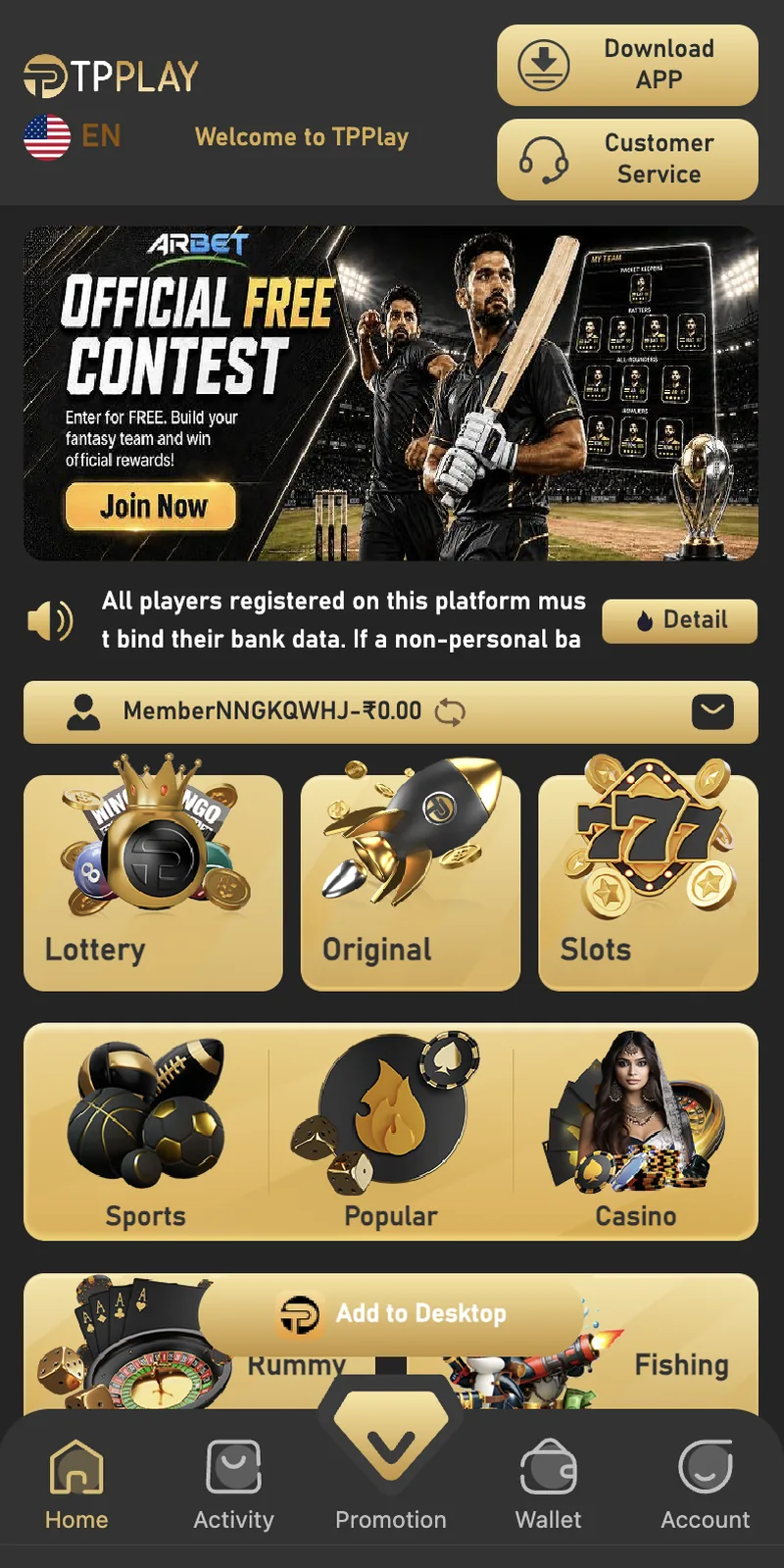
Home screen and game categories
Captured TP Play home screen and game categories.
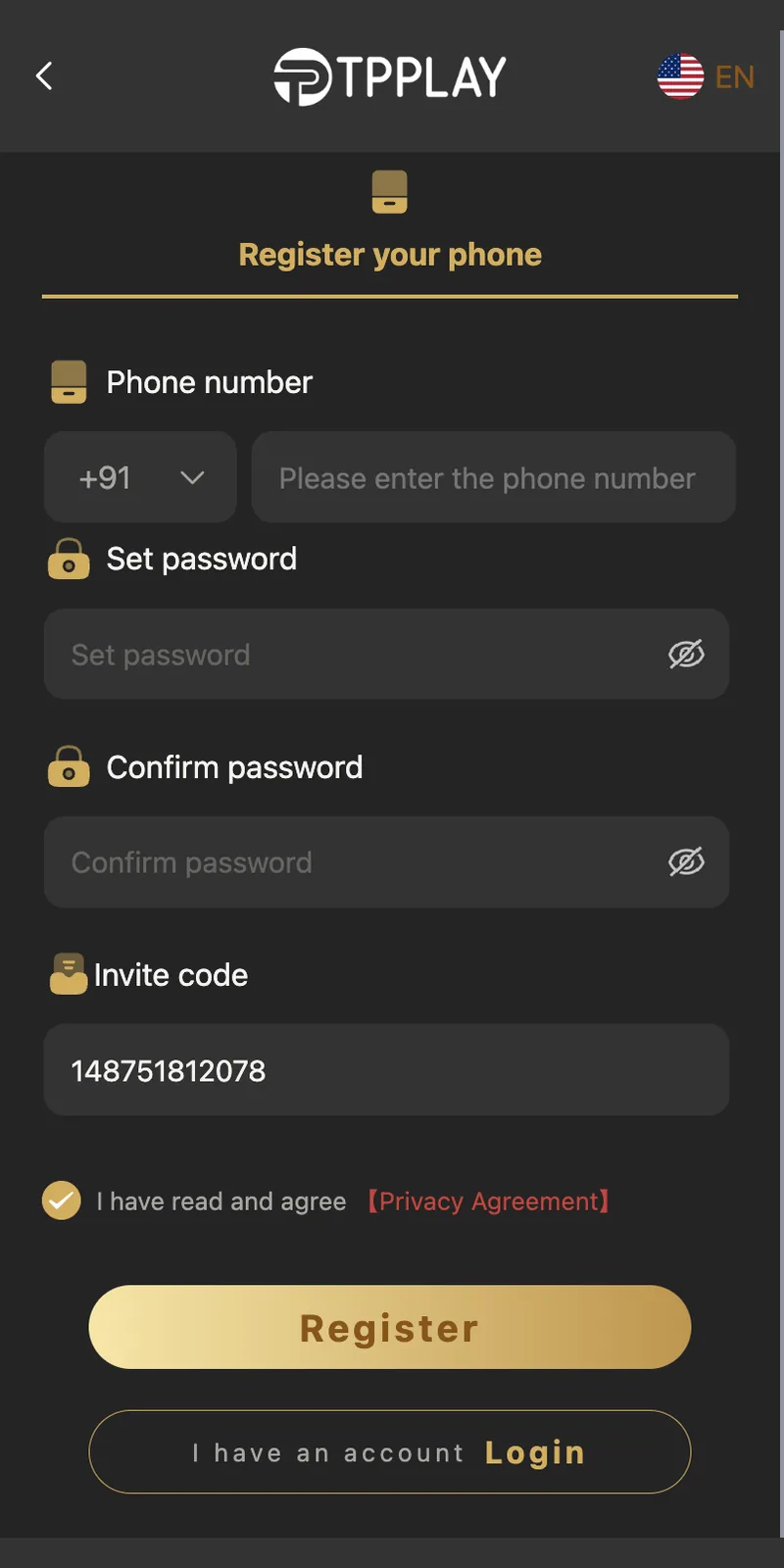
Registration screen with invite code
Captured TP Play registration screen with invite code.
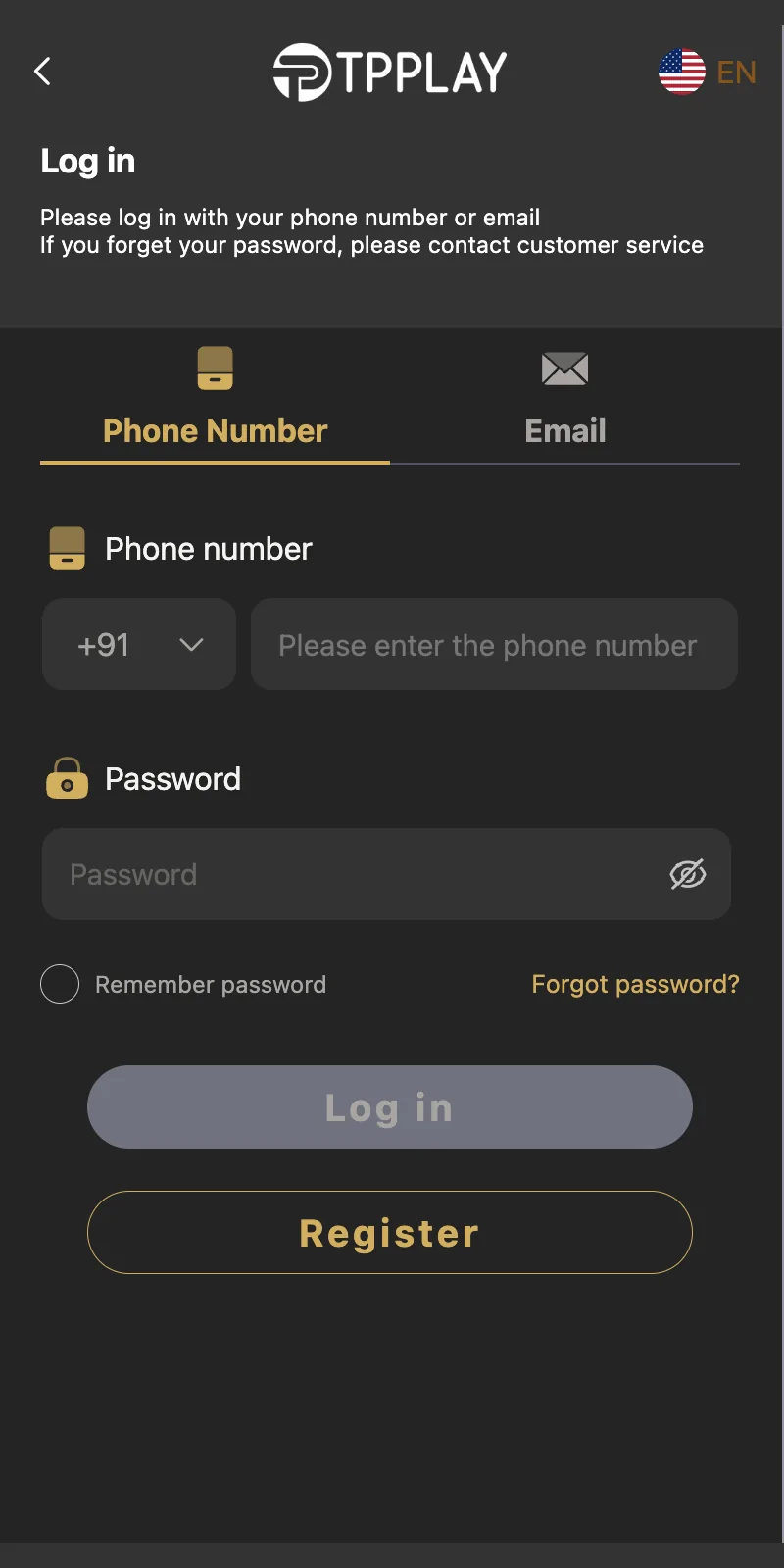
Login screen
Captured TP Play login screen.
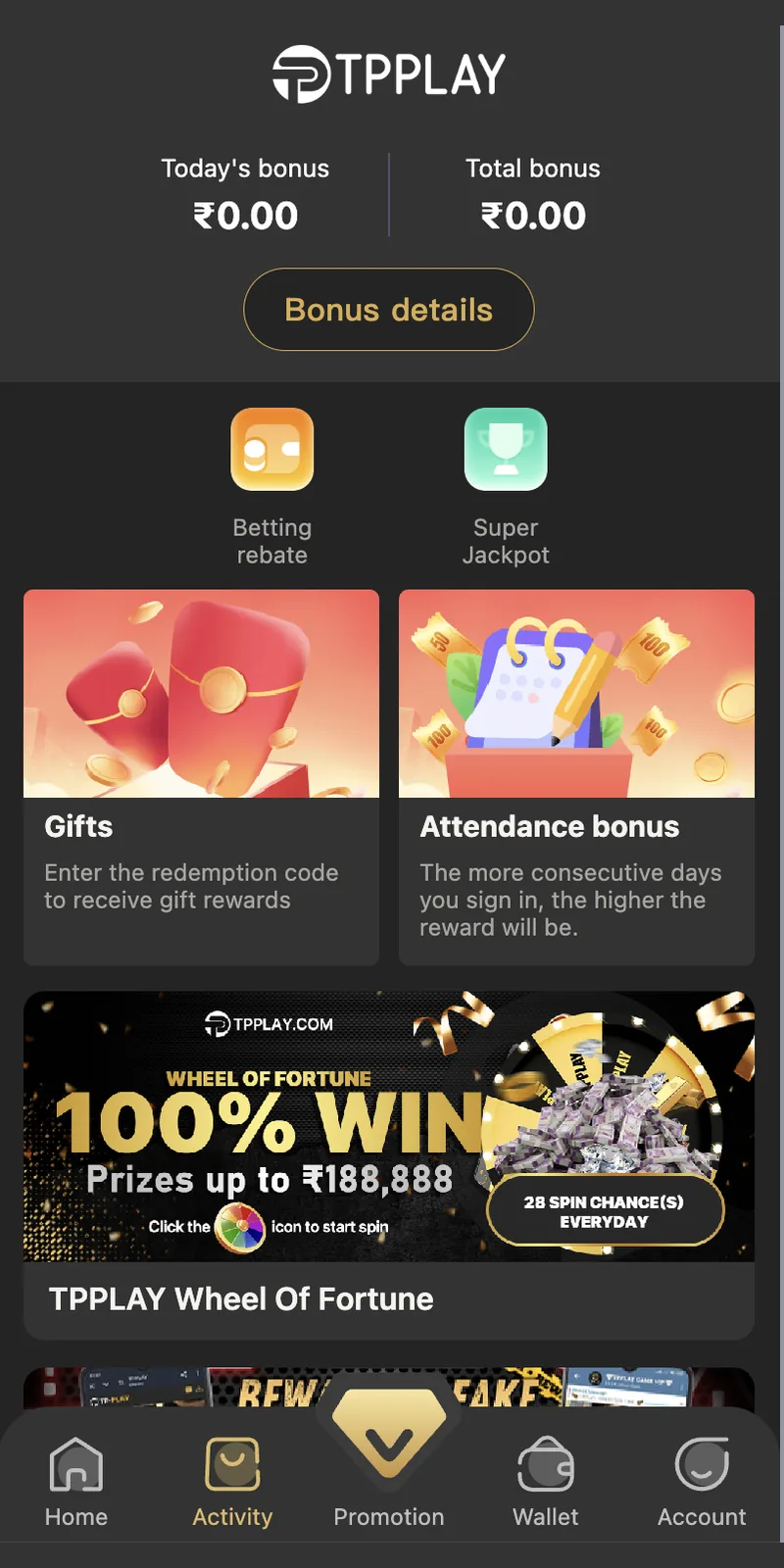
Promotion and bonus screen
Captured TP Play promotion and bonus screen.
Why the Invite Code Is Mandatory
The platform made the invite code a required field in 2024. The Register button on the signup form stays disabled until a valid 12-digit code is entered. Users who try to leave the field blank cannot proceed past the form.
What the Invite Code Does
Every account has a personal invite code. When a new user enters someone's code, the platform links both accounts. After the new user makes the first deposit, both accounts receive a bonus. The bonus size depends on the first deposit amount. On a ₹100 deposit, the referrer receives ₹10. On ₹500, the referrer receives ₹50. Higher deposits unlock larger referral bonuses.
The new user also gets benefits. On a first deposit of ₹500 or more, the platform credits a welcome gift to the new account. The gift appears in the Gifts section under Account.
The Invite Code for This Guide: 148751812078
This page provides the invite code 148751812078 for new users. Enter it during step 4 of registration. The code links to the account that published this guide, which funds the ongoing maintenance of these pages.
What Happens If You Skip the Invite Code
You cannot skip it. The registration form does not accept submissions with an empty Invite Code field. If you do not have a code from a friend, use 148751812078.
What If Your Friend's Code Fails
Invite codes expire when the associated promotion ends. If a friend's code returns an error, try 148751812078 instead. Codes are case-insensitive but must be exactly 12 digits with no spaces or hyphens.
Requirements Before You Start Registration
Gather these six items before opening the signup form. Missing any one will pause the process.
📱 Active +91 Mobile Number
Prepaid or postpaid. Must receive SMS. Not already linked to an account. Check by trying Login first.
🔒 8-Character Password
At least one capital letter and one number. Avoid name, birthdate, or phone number. Reuse from other apps is the top cause of account theft.
🎁 Invite Code 148751812078
Mandatory 12-digit code. The Register button does not activate without it. Copy from this page.
🌐 Stable Internet
4G, 5G, or Wi-Fi with at least 2 bars. Weak connections cause OTP delays and timeout errors.
🆔 KYC Documents (After Registration)
Aadhaar card, PAN card, bank account or UPI ID. Required before first withdrawal, not before registration.
💳 Payment Method (After Registration)
UPI app like PhonePe, Google Pay, Paytm, or a bank account with net banking. Needed when you deposit.
Register vs Login vs KYC
These three steps are separate. Each one unlocks a different part of the platform.
| Step | When | What It Does | Repeat |
|---|---|---|---|
| Register | First time | Creates the account with mobile number, password, and invite code | Once |
| Login | Every session | Grants access to the existing account using mobile number and OTP | Every open |
| KYC | Before first withdrawal | Verifies identity with Aadhaar, PAN, and bank details | Once |
12 Registration Errors and How to Fix Them
1. OTP Not Arriving
Wait 60 seconds. Check signal strength. Clear your SMS inbox if it is full. Tap Resend OTP once. If the OTP still does not arrive within 5 minutes, open in-app customer service.
2. "Mobile Number Already Registered"
The number was used before. Switch to the Login page. If you do not remember the password, tap Forgot Password and reset it through OTP.
3. Password Rejected
The password does not meet the rules. It must be at least 8 characters, contain one capital letter, and contain one number.
4. Invite Code Rejected
The code is 12 digits. Check for typos. Use 148751812078 exactly. Refresh the form and re-enter if the error persists.
5. Register Button Greyed Out
The invite code field is empty or invalid. Paste 148751812078. If still grey, check the mobile number and password fields.
6. App Crashes Mid-Signup
Uninstall the app. Download the latest version from tpplayofficial.in. Ensure 500MB free storage. Retry.
7. OTP Entered But Account Not Activated
Wait 2 minutes. Try to log in with your mobile number and password. If login succeeds, the account activated. If not, contact support.
8. Country Code Wrong
Set the country code to +91. The platform is only available for Indian mobile numbers.
9. "Too Many Attempts"
The system blocked you for 30 minutes after multiple failed OTP requests. Wait the full 30 minutes.
10. Registration Form Freezes on Mobile
Disable ad blockers and VPN extensions. Switch from Wi-Fi to mobile data. Open the site in incognito if it persists.
11. OTP Looks Wrong
Read the SMS carefully. The OTP is 6 digits. Ignore promotional text. Type the digits manually. Do not tap any link inside the SMS.
12. Auto Logout Right After Registering
Normal. The platform logs you out after 15 minutes of inactivity. Log in again with your mobile number and password.
Registration Security Rules
- Never share the OTP. Customer support never asks for OTPs. Anyone who asks is running a scam.
- Use a unique password. Do not reuse a password from Gmail, Facebook, or your bank.
- Enable phone screen lock. A PIN, fingerprint, or face unlock prevents unauthorized access.
- Avoid public Wi-Fi during signup. Public networks expose form data. Use mobile data or home Wi-Fi.
- Confirm the domain. The official site is tpplayofficial.in. Fake clones exist with similar spellings.
- Save your UID. After registration, note your numeric player ID from Account for support tickets.
What to Do Immediately After Registration
- Log In and Check the WalletThe app logs you in automatically. Open Wallet to see a ₹0.00 balance. No deposit is required to keep the account active.
- Deposit FundsOpen Wallet, tap Deposit, choose UPI-QR, Innate UPI-QR, UPI-QR PAY, USDT, or ARPay. Enter an amount from ₹100 to ₹50,000.
- Claim the Welcome GiftFirst deposits of ₹500 or more receive a gift. Open Account, then Gifts, and tap Receive.
- Complete KYCOpen Account, then VIP, then KYC. Upload Aadhaar, PAN, and bank or UPI details. Verification finishes in 2 to 12 hours.
- Start PlayingPick from Win Go, Wingo, K3, 5D, Aviator, MotoRace, Rummy, Ludo, Cricket, Casino, Slots, or Fishing.
- Track VIP ProgressEvery ₹1 bet earns 1 EXP. Reaching 3,000 EXP unlocks VIP1. Higher levels unlock larger rebates.
Registration Across Devices
Android
Download the APK from the official website. Android users finish registration fastest because the app caches form data and auto-fills the OTP.
iPhone and iPad
iOS users register through the Safari browser. SMS auto-fill works if you grant the browser permission to read messages.
Desktop Web Browser
Desktop registration works in Chrome, Firefox, Edge, and Safari. The form scales to larger screens.
Multiple Devices
The account binds to the mobile number, not the device. You can register on Android and then log in on iPhone or desktop. Only one active session is allowed.
Registration Restrictions
- One account per mobile number. Second attempts return an "already registered" error.
- No registration from restricted states. Users in Andhra Pradesh, Telangana, Assam, Odisha, Nagaland, Sikkim, and Tamil Nadu cannot register.
- No manual activation. Support staff cannot activate an account without OTP.
- No under-18 registration. Age is verified at KYC. Underage accounts are terminated and balances forfeited.
- No virtual or VoIP numbers. The OTP system blocks temporary numbers.
Registration Checklist
- ✅ Mobile number is active and receives SMS
- ✅ +91 country code is selected
- ✅ Password has 8+ characters, one capital letter, one number
- ✅ Invite code 148751812078 is entered
- ✅ Internet has at least 2 bars of signal
- ✅ Device has 100MB or more free storage
- ✅ You are 18 years or older
- ✅ You are not in a restricted state
Registration FAQ
What is the invite code?
Is the invite code mandatory?
How do I register?
Can I register without a mobile number?
Is KYC required to register?
How many accounts can I create?
What if the invite code is rejected?
Is registration free?
How long does registration take?
What password should I use?
Can I change my mobile number after registering?
Is registration safe?