Deposit – Complete Add Money Guide
A deposit adds money to your in-app wallet so you can play real-money games. The minimum deposit is ₹100. The maximum per transaction is ₹50,000. Five payment methods are available: UPI-QR, Innate UPI-QR, UPI-QR PAY, USDT, and ARPay. Deposits credit within 30 seconds after you submit the payment receipt.
This page covers the full deposit process step by step. It explains each payment method, the deposit limits, the AR Wallet system for ARB coins, the welcome bonus for first deposits above ₹500, and how to fix the twelve most common deposit errors. By the end, you will know exactly how to add money to your wallet from any device.
What Deposit Actually Does
A deposit converts your rupees into wallet balance inside the app. This balance is used to place bets on games like Win Go, Wingo, K3, 5D, Aviator, and MotoRace. When you win, the winnings return to the same wallet. When you request a withdrawal, funds move from the wallet to your bank account or UPI ID. Deposits are the entry point to real-money play.
Deposit Limits and Payment Methods
The platform supports five deposit methods. Each has its own bonus structure and processing speed.
| Method | Bonus | Credit Time | Ideal For |
|---|---|---|---|
| UPI-QR | None | 30 seconds | Standard UPI users |
| Innate UPI-QR | None | 30 seconds | First-time deposits |
| UPI-QR PAY | None | 30 seconds | Repeated deposits |
| USDT | 2% | 1 to 3 minutes | Crypto users |
| ARPay | 2% | 30 seconds | Highest bonus |
Minimum: ₹100 per transaction. Maximum: ₹50,000 per transaction. Multiple transactions are allowed per day, and there is no fixed daily cap.
How to Deposit – 5 Steps
The deposit flow has five screens. Each takes 20 to 40 seconds.
- Open WalletLogin to your account and tap Wallet in the bottom navigation. The wallet screen shows your current balance, Deposit button, and Withdraw button.
- Choose Payment MethodTap Deposit. Five payment tiles appear: UPI-QR, Innate UPI-QR, UPI-QR PAY, USDT, and ARPay. Pick the method that matches your preferred app or carries the bonus you want. ARPay and USDT both add 2% to your deposit.
- Enter AmountType your deposit amount or pick a preset. Presets include ₹100, ₹300, ₹500, ₹1,000, ₹2,000, ₹3,000, ₹5,000, ₹10,000, ₹20,000, ₹30,000, ₹40,000, and ₹50,000. The amount must be between ₹100 and ₹50,000.
- Complete PaymentA QR code or payment page opens. Scan the QR with your UPI app, or open the banking app for the transfer. Complete the payment for the exact amount you entered.
- Submit ReceiptReturn to the app and submit the receipt. Upload the screenshot or enter the UPI transaction ID. The amount credits to your wallet within 30 seconds.
Deposit Screenshots – Step by Step
Below are the five screens you will see during a deposit.
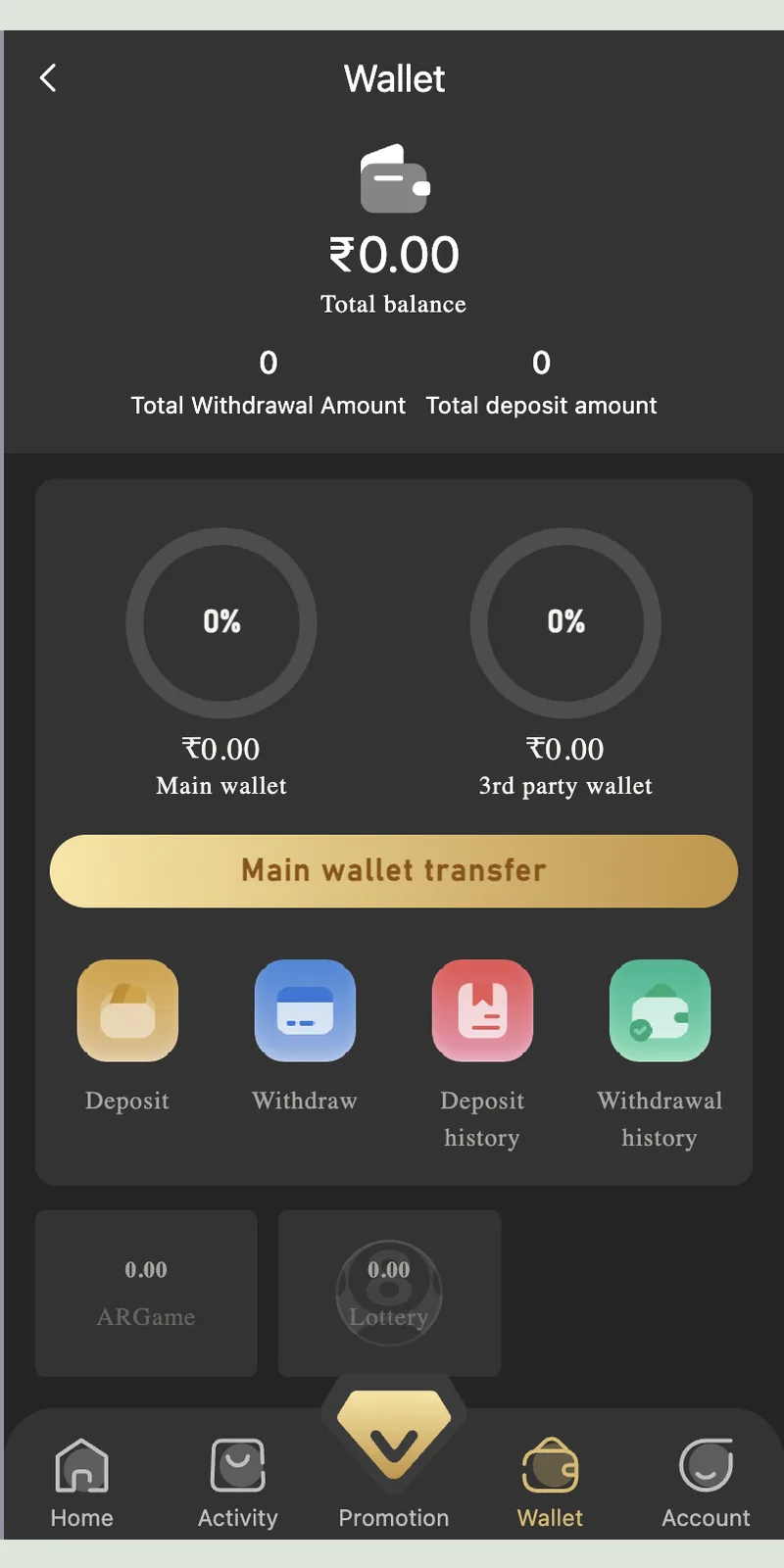
Wallet balance and payment buttons
Captured TP Play wallet balance and payment buttons.
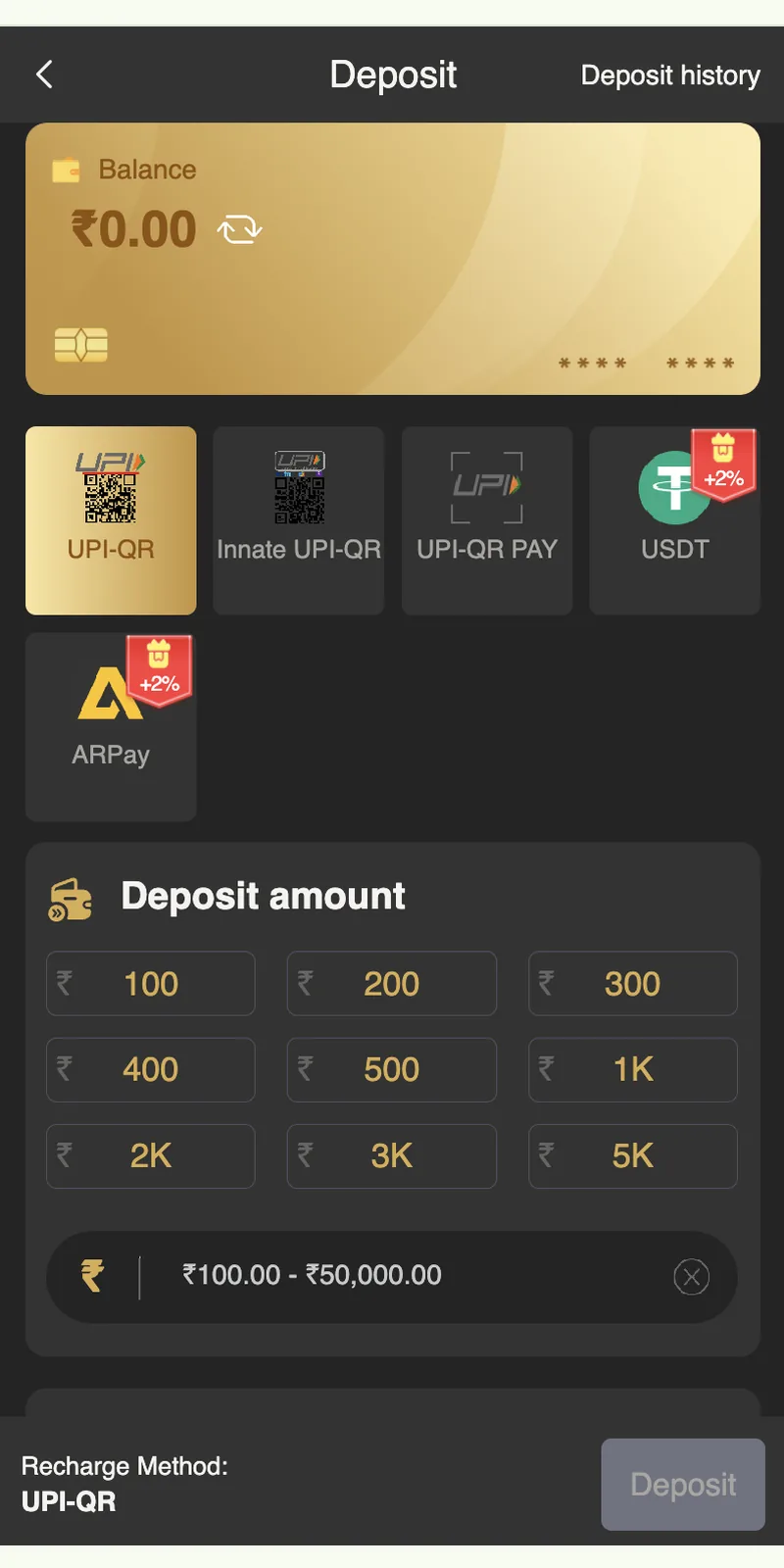
Deposit payment methods
Captured TP Play deposit payment methods.
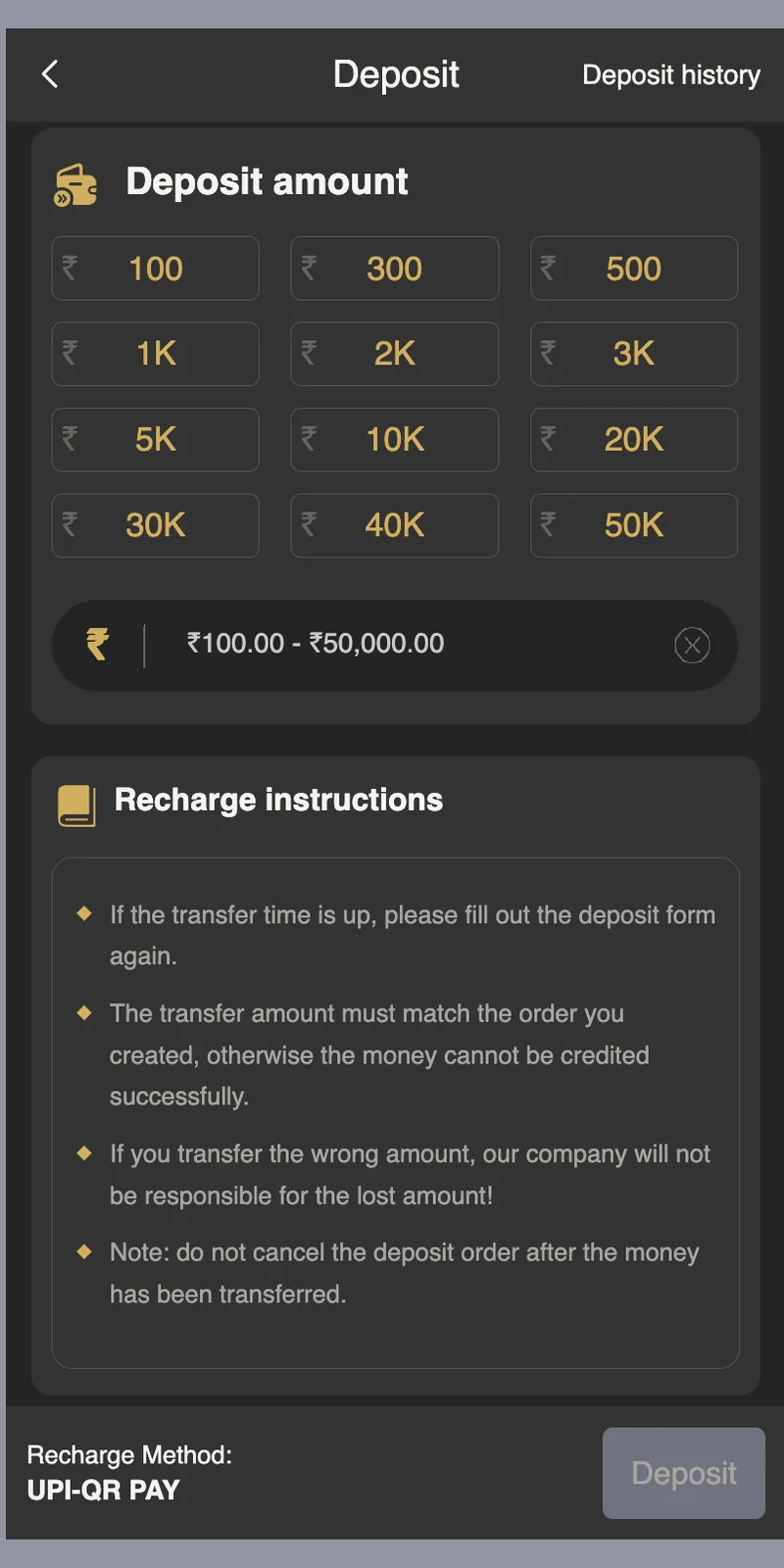
Deposit amount options
Captured TP Play deposit amount options.
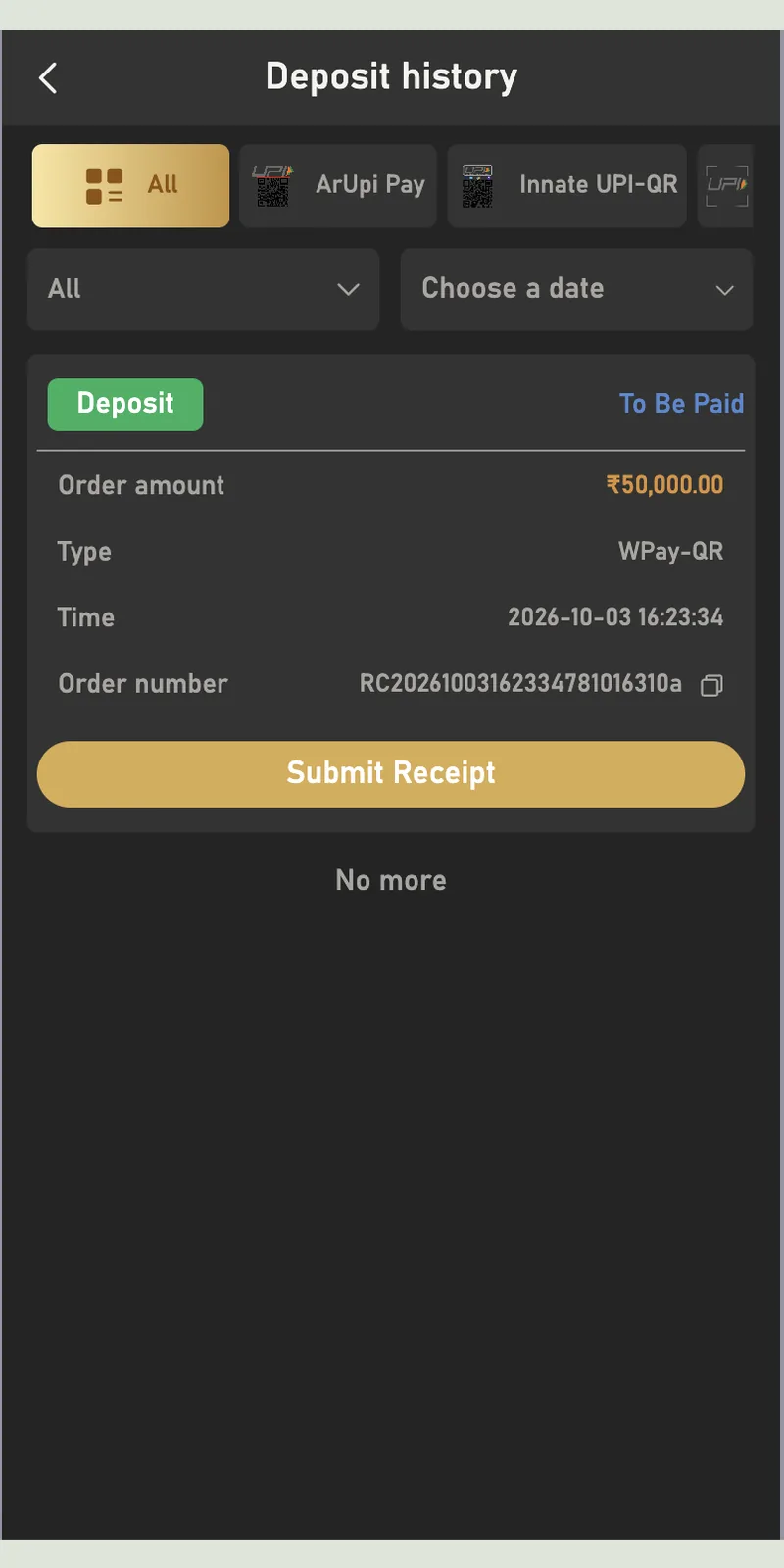
Deposit history
Captured TP Play deposit history.
Wallet balance and payment buttons
Captured TP Play wallet balance and payment buttons.
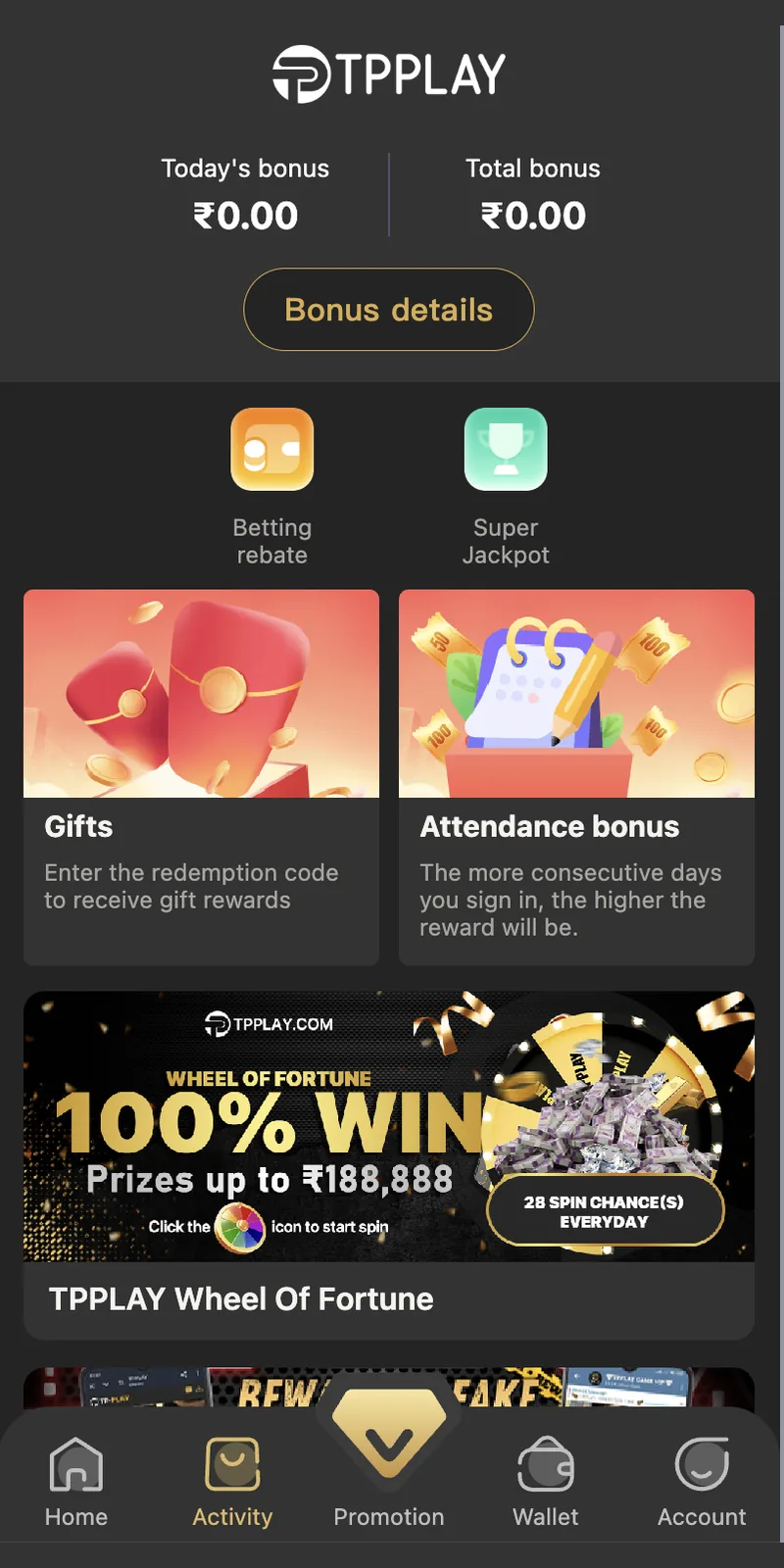
Promotion and bonus screen
Captured TP Play promotion and bonus screen.
Payment Method Details
1. UPI-QR
The standard UPI QR method. A QR code appears after you enter the amount. Open PhonePe, Google Pay, Paytm, or any UPI app, scan the QR, and pay the exact amount. The wallet credits in 30 seconds. No bonus applies on this method.
2. Innate UPI-QR
Same as UPI-QR but uses a dedicated QR generated for first-time depositors. Recommended for the very first deposit because the QR stays active longer, giving you more time to complete the payment.
3. UPI-QR PAY
An alternate UPI flow that opens a payment page directly instead of a QR. Tap the tile, enter the amount, and the UPI app opens automatically. Useful when you are switching between apps quickly.
4. USDT
Deposit with USDT (Tether) on the TRC-20 network. Copy the wallet address, send USDT from your exchange or personal wallet, and submit the transaction hash. Adds 2% bonus. Confirmation takes 1 to 3 minutes after blockchain verification.
5. ARPay
ARPay is the highest-bonus method. It links to your AR Wallet, which holds ARB coins. Buy ARB coins through AR Wallet for a 2% to 5% bonus, then use them for deposits. Adds another 2% bonus on top. Total bonus can reach up to 7%.
AR Wallet – The ARB Coin System
AR Wallet is a separate wallet that holds ARB coins. It works alongside the main wallet and gives higher deposit bonuses.
How to Use AR Wallet
- Open AR WalletTap the AR Wallet option from the deposit screen or the main menu. The wallet opens in a web view with Buy ARB, Recharge ARB, Sell ARB, and Withdraw ARB buttons.
- Buy ARB CoinsTap Buy ARB. Choose a payment method: Secure UPI, Bank Method, Quick UPI, or Quick Buy. Enter the amount. ARB coins arrive in your AR Wallet immediately with a 2% to 5% bonus.
- Recharge from AR WalletReturn to the deposit screen and select ARPay. The ARB balance is now available for direct deposit into your game wallet with a 2% bonus.
- Sell ARB CoinsIf you have unused ARB coins, tap Sell ARB to convert them back to rupees. Selling carries a 1% bonus.
Deposit History and Order Tracking
Every deposit creates an order with a unique order number. You can track the status in Wallet, then Deposit History.
| Status | What It Means | Action |
|---|---|---|
| To Be Paid | Order created, payment not yet submitted | Complete the payment and submit the receipt |
| Processing | Receipt submitted, verification in progress | Wait 30 seconds to 30 minutes |
| Paid | Payment verified and credited to wallet | Balance is updated |
| Failed | Amount mismatch or receipt invalid | Contact support with the order number |
Each order shows the order amount, payment type, timestamp, and order number. Save the order number. It is required for any support query about that deposit.
12 Deposit Errors and How to Fix Them
1. Deposit Not Credited After Payment
Cause: Receipt not submitted or still in verification. Fix: Open Wallet, tap Deposit History, and check the order status. If it shows To Be Paid, submit the receipt. If it shows Processing, wait 30 minutes. If it shows Paid but the balance is unchanged, contact support with the order number.
2. Wrong Amount Transferred
Cause: You transferred a different amount than the order. Fix: Contact support with the order number and the UPI transaction ID. Support matches the amount manually. This takes 24 to 48 hours.
3. QR Code Expired
Cause: The QR code expires after 5 minutes. Fix: Cancel the old order and create a new one. Transfer the amount to the new QR immediately.
4. UPI App Shows "Transaction Failed"
Cause: Bank server issue or UPI daily limit reached. Fix: Check with your bank about the UPI daily limit (usually ₹1 lakh). Wait 10 minutes and retry. Use a different UPI app if the issue persists.
5. Deposit Order Stuck in Processing
Cause: Manual verification during peak hours. Fix: Wait up to 30 minutes. If the status still shows Processing after 30 minutes, contact support with the order number.
6. Submitted Wrong Receipt
Cause: Uploaded a screenshot from an old transaction. Fix: Contact support immediately with the correct receipt and the order number. Support corrects the submission.
7. Cannot Select Payment Method
Cause: App version outdated or network issue. Fix: Update the app from tpplayofficial.in. Clear cache from Account, then Settings. Retry.
8. App Crashes on Deposit Screen
Cause: Low RAM or background app conflicts. Fix: Close background apps. Restart the app. If crashes persist, clear app data and log in again.
9. USDT Deposit Not Confirming
Cause: Wrong network selected. Fix: Confirm you sent USDT on the TRC-20 network, not ERC-20 or BEP-20. Wrong-network transfers are unrecoverable.
10. ARWallet Buy ARB Fails
Cause: UPI app conflict or ARWallet session expired. Fix: Close ARWallet and reopen it from the deposit screen. Retry the purchase.
11. "Deposit Limit Reached" Error
Cause: You already deposited ₹50,000 in a single transaction. Fix: Create a new order for a smaller amount. Multiple transactions per day are allowed.
12. Deposit Reflected in Wallet But Games Show Zero Balance
Cause: App cache holding old balance. Fix: Log out and log in again. The updated balance appears after re-login.
Deposit Security Rules
- Use your own bank or UPI. Third-party payments are rejected during KYC and can freeze your account. The bank account or UPI ID must match the name on your KYC documents.
- Transfer the exact amount. Mismatched amounts require manual support intervention, which takes up to 48 hours.
- Never cancel a paid order. If you cancelled the order after transferring money, contact support immediately. The funds are not lost but need manual recovery.
- Verify the QR before paying. The QR always points to an official platform wallet. Cross-check the merchant name shown in your UPI app.
- Save every receipt. Keep the UPI transaction ID and screenshot until the deposit credits. Support needs these if any issue arises.
- Do not use public Wi-Fi. Public networks expose banking data. Use mobile data or home Wi-Fi.
- Do not share OTPs. Neither the platform nor your bank asks for OTPs over chat or phone. Anyone who asks is running a scam.
Deposit Bonuses Explained
2% Bonus on ARPay and USDT
Both methods add 2% on top of the deposited amount. Deposit ₹1,000 and receive ₹1,020 in the wallet. Deposit ₹5,000 and receive ₹5,100. The bonus credits automatically within 30 seconds of the deposit confirmation.
Welcome Gift for First Deposit Above ₹500
New users who make their first deposit of ₹500 or more receive a welcome gift. The gift appears in Account, then Gifts. Tap Receive to claim. The gift comes as cash balance or a top-up coupon depending on the current promotion.
AR Wallet Stack Bonus
Buy ARB coins for a 2% to 5% bonus. Use the ARB balance for a deposit through ARPay for another 2% bonus. Total bonus can reach 7%. The 7% bonus is the highest available on any deposit method.
Referral Bonus
When your referred friend makes their first deposit of ₹100 or more, you receive a referral bonus. The bonus scales with the deposit amount. Deposit size determines your reward — ₹10 for ₹100 deposits, ₹50 for ₹500 deposits, and higher tiers for larger amounts.
Deposit on Different Devices
Android
Android users deposit through the app. The UPI-QR method auto-opens the installed UPI app. Fastest deposit experience. Average completion time: 90 seconds.
iPhone
iOS users deposit through Safari. The UPI apps open through the iOS share sheet. Slightly slower than Android because you switch between Safari and the UPI app manually. Average completion time: 2 minutes.
Desktop Web Browser
Desktop users open the site in Chrome, Firefox, or Edge. Scan the QR shown on the screen with your phone's UPI app. Useful when your phone is charging. Average completion time: 2 to 3 minutes.
Multiple Devices
Deposits are linked to your account, not your device. You can start a deposit on Android and complete it on desktop if needed. Only one active session at a time is allowed.
Deposit Checklist
- ✅ Logged into your account (mobile number + password + OTP)
- ✅ Bank or UPI account registered in your own name
- ✅ Amount between ₹100 and ₹50,000
- ✅ UPI app installed and linked to your bank
- ✅ Stable 4G or Wi-Fi connection
- ✅ 30 seconds available to submit the receipt
- ✅ Exact amount ready to transfer
- ✅ Screenshot or transaction ID saved after payment
With all items confirmed, the deposit completes in 90 seconds on average.
Deposit FAQ
What is the minimum deposit amount?
What payment methods are supported?
How long does a deposit take to credit?
Do I need KYC to deposit?
What if the deposit amount is not credited?
Can I deposit using someone else's bank account?
Is there a deposit bonus?
Can I cancel a deposit order?
What is AR Wallet?
Does the platform charge deposit fees?
What is the daily deposit limit?
Can I deposit using a credit card?