Customer Care – Every Support Channel
The platform runs three official support channels. Each one handles a different type of query. Using the right channel gets your issue resolved faster than posting everywhere at once.
Live chat handles account-specific problems like login failures, missing deposits, and withdrawal delays. Email covers documentation requests and formal complaints. The Telegram channel posts gift codes, promotional updates, and maintenance notices but does not handle account-specific issues.
Support Channels at a Glance
| Channel | Best For | Response Time |
|---|---|---|
| Live Chat (in-app) | Login, deposit, withdrawal, bonus issues | 5 to 15 minutes |
| Formal complaints, document requests | 2 to 12 hours | |
| Telegram Channel | Gift codes, promotions, announcements | Not a support channel |
How to Reach Live Chat in 30 Seconds
Live chat sits inside the app. It handles every account-specific issue and is the fastest path to support.
- Open the AppLaunch the Android app or open the site in your mobile browser. Login with your mobile number and password if the session has expired.
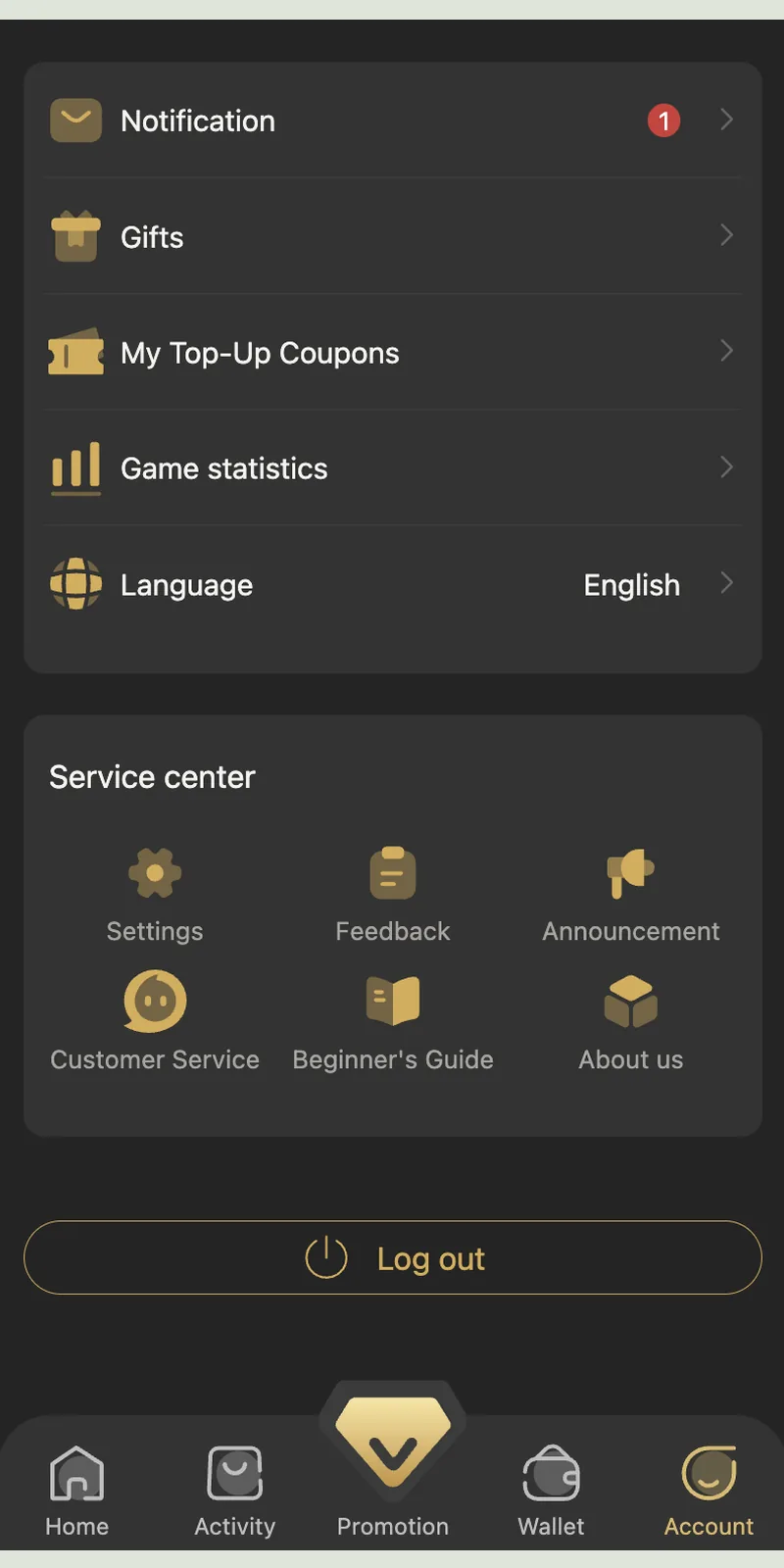
- Tap AccountThe Account tab sits at the bottom right of the navigation bar. Tap it to open your profile.
- Tap Customer ServiceScroll to the Service Center section. Six tiles appear: Settings, Feedback, Announcement, Customer Service, Beginner's Guide, and About Us. Tap Customer Service.
- Start the ChatThe live chat window opens. Type your message with the specific issue, your UID, and any relevant order number. An agent joins within 5 to 15 minutes.
- Keep the Chat OpenDo not close the chat window while waiting for an agent. If the app goes into the background, the chat session closes after 15 minutes of inactivity.
What to Include in Your Support Ticket
A well-formed ticket resolves twice as fast as a vague one. Include these five items in your first message.
🆔 Your UID
The numeric player ID shown in the Account section next to your username. Example: 1971799. Every ticket needs this.
📋 Order Number
For deposit or withdrawal issues, include the full order number from Deposit History or Withdrawal History. Format: RC20261003162334781016310a.
📸 Screenshot
Attach a screenshot of the error screen, the transaction receipt, or the wallet balance. Visual evidence eliminates back-and-forth questions.
⏰ Timestamp
Note the exact time the issue occurred. Support uses the timestamp to pull server logs from that minute.
📝 Short Description
One or two sentences describing the issue. "Deposit of ₹500 not credited after UPI payment at 3:45 PM" works better than a paragraph of background.
✅ Steps Already Tried
Mention anything you already tried — for example, "logged out and in again" or "restarted the app." This prevents support from suggesting the obvious.
12 Common Issues You Can Fix Without Support
Before opening a support ticket, try these twelve fixes. They resolve over 60% of common problems instantly.
1. Login OTP Not Arriving
Check your mobile signal. Wait 60 seconds. Tap Resend OTP once. Clear your SMS inbox if it holds more than 500 messages. If the OTP still does not arrive within 5 minutes, then contact support.
2. Deposit Not Credited
Open Wallet, then Deposit History. Check the order status. If it shows "To Be Paid," submit the receipt. If it shows "Processing," wait up to 30 minutes. If it shows "Paid" but the balance is unchanged, log out and log in again.
3. Withdrawal Stuck in Pending
Withdrawals process within 30 minutes to 3 hours. Wait the full 3 hours. If it is still Pending, note the order number and open live chat.
4. Bonus Not Appearing
Open Account, then Gifts. Check for an unread gift with a red badge. If the bonus was supposed to credit from a rebate claim, check the Promotion tab. Log out and log in if the app cache shows an old balance.
5. Invite Code Rejected
Invite codes are exactly 12 digits. Check for spaces or missing digits. Use 148751812078 if a friend's code fails.
6. App Crashes on Launch
Uninstall the app. Download the latest APK from the official site. Ensure at least 500 MB free storage before reinstalling.
7. Black Screen After Login
Update Android System WebView from the Play Store. Restart the app. If the black screen persists, restart your phone.
8. Payment Page Freezes
Close the app and your UPI app (PhonePe, Google Pay, Paytm). Reopen the app and retry the deposit. Switch from Wi-Fi to mobile data if the issue repeats.
9. Session Expired Repeatedly
Sessions time out after 15 minutes of inactivity. This is normal. If sessions expire every few seconds, clear app cache from Account, then Settings.
10. Level-Up Reward Missing
Level-up rewards credit automatically. Log out and log in. The reward appears in the wallet or the bonus wallet section. Check both.
11. Rebate Counter Stuck at Zero
Rebate resets at 01:00:00 IST daily. If the counter shows zero right after that time, it is expected — place new bets to start the new counter. Use the One-Click Rebate button to claim pending balances.
12. App Slow or Laggy
Close background apps. Keep at least 500 MB free storage. Restart the phone if lag persists. The app requires 2 GB RAM minimum.
Escalation Path – When Live Chat Doesn't Resolve It
Most issues resolve in the first live chat session. If not, the escalation path has three stages.
Stage 1 – Live Chat (0 to 48 hours)
Every issue starts here. Live chat handles account-specific problems directly. Response in 5 to 15 minutes. Resolution typically within 24 hours.
Stage 2 – Senior Agent (48 to 96 hours)
If the issue is not resolved within 48 hours, request escalation. Provide the chat reference number and a concise summary. A senior agent reviews the case and responds within 48 hours.
Stage 3 – Formal Review (96+ hours)
For unresolved cases past 96 hours, request a formal review. Include all prior chat reference numbers, screenshots, and order details. Formal reviews take 5 to 7 business days to resolve.
Telegram Channel – What It Is and Isn't
The Telegram channel at t.me/+9gTrtt1w7QhhNTc1 is the official community hub. It serves three purposes.
What the Channel Provides
- Gift Codes: Fresh codes posted during promotions and festival events.
- Announcements: Maintenance windows, new game launches, and rule updates.
- Promotional Updates: Notification when new bonuses or events go live.
What the Channel Does Not Do
- It does not handle account-specific issues. Deposit, withdrawal, and login problems go through live chat.
- It does not ask for OTPs or passwords. Any message asking for these is a scam.
- It does not offer private support via direct messages. Official support runs through the in-app chat only.
Reporting Fraud and Fake Support
Fake support agents target players across social media, WhatsApp, and Telegram. Recognising them prevents account theft.
Red Flags of Fake Support
- Asking for your OTP, password, or MPIN.
- Requesting payment to "unlock" a withdrawal or "verify" an account.
- Contacting you first from a private number or DM.
- Offering "instant account recovery" for a fee.
- Claiming to be from the "TP Play head office" with a phone number.
How to Report
- Do Not EngageStop replying immediately. Do not share any information, even if the scammer claims to have your data.
- Screenshot the ConversationCapture every message. Include the scammer's username, phone number, or Telegram handle.
- Open Live ChatReport the scam through the in-app Customer Service channel. Include the screenshots and the time of contact.
- Change Your PasswordIf you already shared credentials, change your password immediately from the login screen's Forgot Password option.
India's cybercrime portal accepts online fraud complaints at cybercrime.gov.in. For significant financial loss, file a report there alongside the in-app complaint.
Account Recovery – When Support Is Needed
Some situations require live chat intervention even after self-service attempts. These cases need proper documentation.
Changed Mobile Number
Log in with your active number if possible. If your registered number is no longer active, open live chat and provide your UID, past deposit records, and the new mobile number. Support transfers the account to the new number in 24 to 48 hours after verification.
Forgotten Password Without Email Access
Password resets run through OTP on the registered number. If you cannot access that number, use live chat with your UID and past transaction records. Support resets the account manually after verification.
Suspended Account
Accounts suspend for multiple accounts, self-referral, or suspicious payment activity. Open live chat with your UID. Explain the situation factually. The team reviews the case and responds within 48 hours.
Missing Bonus After Meeting Turnover
If a bonus does not credit after meeting its turnover requirement, capture the Bet History for the qualifying period. Open live chat with the round numbers and the bonus type. Support verifies the turnover against the system logs.
12 Support Errors and How to Fix Them
1. Live Chat Window Won't Open
Cause: App version outdated or network issue. Fix: Update the app from the official site. Retry on a different network.
2. Agent Not Responding
Cause: Peak-hour queue. Fix: Wait 30 minutes. If no response after 30 minutes, close the chat and reopen it to get a new agent.
3. Chat Session Closed Midway
Cause: The app went to background for over 15 minutes. Fix: Reopen live chat. Provide the previous chat's reference number if available.
4. Support Asks for Information You Don't Have
Cause: Verification step needed. Fix: If you cannot provide an order number, provide the timestamp and deposit amount. Support can cross-reference.
5. Email Response Delay
Cause: Email responses take 2 to 12 hours. Fix: Check spam folder. If no response after 24 hours, resend the email with the same subject.
6. Screenshot Upload Failing in Chat
Cause: File size over 5 MB. Fix: Compress the image or crop it to show only the relevant portion. Retry the upload.
7. Support Claims No Record of Deposit
Cause: Payment sent to wrong UPI or from an unlinked account. Fix: Share the UPI transaction ID and the bank statement entry. Support verifies against the payment gateway records.
8. Agent Requesting OTP
Cause: Scammer impersonating support. Fix: Stop the conversation. Report through a fresh chat. The official team never asks for OTP.
9. Telegram Support Not Responding to DM
Cause: The official channel does not handle DMs. Fix: Use the in-app live chat instead. Telegram is for announcements only.
10. Account Locked After Support Chat
Cause: Support detected suspicious activity during verification. Fix: Wait for the formal review email. Respond with the requested documentation.
11. Password Reset Not Working
Cause: OTP delivery failing or new password rejected. Fix: Ensure the new password is 8 characters with one capital letter and one number. Try the reset again with a stronger signal.
12. Multiple Tickets with No Response
Cause: Multiple tickets on the same issue dilute the queue. Fix: Use the original ticket. Reply to the same chat session instead of opening new ones.
Support Security Rules
- Never share OTP or password. The official team never asks for these. Anyone who asks is running a scam.
- Verify the channel. Live chat runs only inside the app. Telegram runs only at t.me/+9gTrtt1w7QhhNTc1. Any other URL or DM is fake.
- Do not pay for support. Support is free. Anyone asking for a payment to unlock an account or speed up a withdrawal is a scammer.
- Screenshot every interaction. Save chat transcripts and email threads. They are the reference if a case escalates.
- Use your own UID only. Do not share your UID on public forums. It is the primary identifier for account recovery.
- Report suspicious contact immediately. Even if you did not fall for the scam, reporting helps protect other users.
- Log out on shared devices. If you log in on a friend's phone for support, log out immediately after the issue resolves.
Support Checklist
- ✅ Your UID noted (Account section)
- ✅ Order number (for deposit or withdrawal issues)
- ✅ Screenshot of the error or receipt
- ✅ Timestamp of the issue
- ✅ Self-service fixes already tried
- ✅ Stable internet connection
- ✅ App updated to latest version
- ✅ Live chat or email open (not both for the same issue)
Customer Care FAQ
How do I contact TP Play customer care?
Is TP Play customer care available 24/7?
What issues can customer care help with?
How long does it take to get a response?
Does customer care ask for my OTP?
What is the TP Play Telegram channel?
How do I report a scam or fake support agent?
What information do I need to provide for support?
Can customer care change my registered mobile number?
Why was my account suspended?
Does customer care have a phone number?
How do I escalate an unresolved issue?
Related Guides