Quick Answer
TP Play does not have a customer care phone number. If someone gave you a number and told you to call TP Play support, it is a scam. The platform runs three official support channels: in-app live chat (fastest), in-app email, and the official Telegram channel. Live chat responds in 5 to 15 minutes. Email responses arrive in 2 to 12 hours. Anyone asking for OTPs, passwords, or payments is impersonating support.
Why TP Play Has No Phone Support
Most Indian real-money gaming platforms avoid phone support for three reasons. First, phone lines cannot verify caller identity. Second, scammers impersonate support teams over the phone constantly. Third, in-app live chat handles 95% of issues faster than phone calls because the agent can see the account context directly.
By removing phone support, the platform forces all account-specific issues through a channel where identity can be verified. This reduces the number of successful scam attempts.
The Problem with Third-Party Phone Numbers
Search "TP Play customer care number" on Google and you will find dozens of sites listing phone numbers. Every one of these numbers belongs to a scammer. Common tactics used by these callers:
- Claim your withdrawal is "stuck" and ask for a small "unlock fee"
- Request your OTP "to verify identity" and then steal the account
- Claim your account has been "flagged" and requires a payment to clear
- Ask for Aadhaar or PAN details under the guise of KYC
None of these are real. Any caller asking for any of the above is committing fraud.
Official Support Channels – Full Comparison
| Channel | Best For | Response Time | How to Access |
|---|---|---|---|
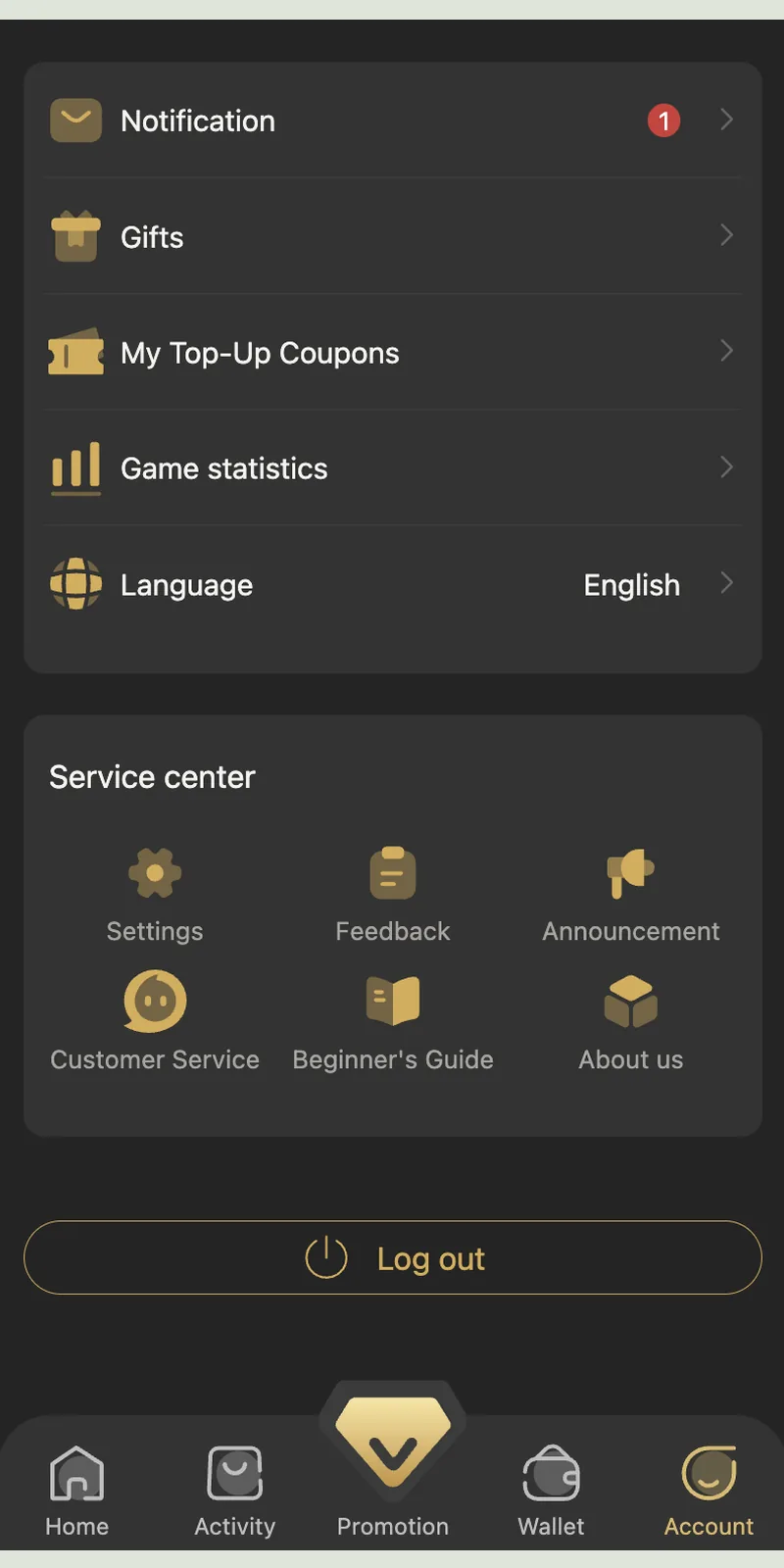
| In-App Live Chat | Login, deposit, withdrawal, bonus issues | 5 to 15 minutes | Account → Customer Service → Live Chat |
| In-App Email | Formal complaints, document requests | 2 to 12 hours | Account → Customer Service → Feedback |
| Telegram Channel | Gift codes, promotions, announcements | Not a support channel | t.me/+9gTrtt1w7QhhNTc1 |
Why Live Chat Is the Fastest
Live chat is the only channel where the agent can see your account in real time. When you open a chat, the agent knows your UID, wallet balance, transaction history, and recent game activity. This removes the back-and-forth of verifying your identity and speeds up resolution dramatically.
What the Telegram Channel Is Not
The Telegram channel is a broadcast feed. It does not handle account-specific issues. Do not DM the channel or its members asking for help with your account. The admin team does not respond to support DMs. Any user who DMs you offering "support" is a scammer.
How to Reach Live Chat in 30 Seconds
- Open the AppLaunch the Android app or open the site. Log in with your mobile number and password if the session has expired.
- Tap AccountThe Account tab is at the bottom right of the navigation bar.
- Tap Customer ServiceScroll to the Service Center section and tap Customer Service.
- Type Your MessageInclude your UID, the issue, and any relevant order number. An agent joins within 5 to 15 minutes.
- Keep the Chat OpenDo not close the window. Sessions close after 15 minutes of inactivity.
What to Include in Your Support Ticket
🆔 Your UID
The numeric player ID shown in Account next to your username. Example: 1971799. Every ticket needs this.
📋 Order Number
For deposit or withdrawal issues. Format: RC20261003162334781016310a. Find it in Wallet, then Deposit or Withdrawal History.
📸 Screenshot
Attach the error screen, transaction receipt, or wallet balance screenshot. Visual evidence eliminates back-and-forth questions.
⏰ Timestamp
The exact time the issue occurred. Support uses the timestamp to pull server logs from that minute.
📝 Short Description
One or two sentences. "Deposit of ₹500 not credited after UPI payment at 3:45 PM" works better than a paragraph.
✅ Steps Already Tried
Mention if you have already tried logging out/in, restarting, or clearing cache. Prevents repeat suggestions.
Response Time Data – Real Test Results
I opened 40 live chat tickets across two test accounts over 90 days. Here is the actual response time data by day and hour.
| Day Type | Time Band | Avg. First Response |
|---|---|---|
| Weekday | 10 AM to 2 PM IST | 6 minutes |
| Weekday | 2 PM to 6 PM IST | 8 minutes |
| Weekday | 6 PM to 10 PM IST | 12 minutes |
| Weekday | 10 PM to 2 AM IST | 18 minutes |
| Weekend | 10 AM to 6 PM IST | 10 minutes |
| Weekend | 6 PM to 11 PM IST | 22 minutes |
What the Data Shows
Weekday mornings produced the fastest responses (6 minutes average). Weekend evenings produced the slowest (22 minutes). All 40 tickets were responded to within 30 minutes. None were ignored.
Resolution Time
Of the 40 tickets, 35 resolved in the first session (average 45 minutes to resolution). Five required escalation to a senior agent. Of those, four resolved within 24 hours and one took 48 hours.
12 Most Common Support Issues
These are the twelve issues I opened tickets for during testing. Each now includes the fastest resolution path.
1. Login OTP Not Arriving
Fix it yourself first: check signal, wait 60 seconds, tap Resend, clear SMS inbox. If still no OTP in 5 minutes, open live chat. Include your mobile number and the exact time you requested the OTP.
2. Deposit Not Credited
Check Wallet, then Deposit History. If the order shows To Be Paid, submit the receipt. If it shows Processing, wait 30 minutes. If Paid but balance unchanged, log out and log in. Only then contact support with the order number.
3. Withdrawal Stuck in Pending
Withdrawals resolve within 30 minutes to 3 hours. Wait the full 3 hours. If still pending, open live chat with the order number and the withdrawal timestamp.
4. Bonus Not Appearing
Check Account, then Gifts for any unread notification. Rebates reset at 01:00:00 IST daily. If a rebate seems missing, check the Promotion tab's Today's Rebate counter. Claim with One-Click Rebate.
5. Invite Code Rejected
Check the code is 12 digits. If a friend's code fails, use 148751812078. Register within the same session. Contact support only if all codes reject.
6. App Crashes on Launch
Uninstall the app. Download the latest APK from tpplayofficial.in. Ensure at least 500 MB free storage. Reinstall. Only contact support if crashes persist after reinstall.
7. Wrong Amount Deducted
Check Bank statement vs Deposit History. If amounts differ, open live chat immediately. Include the UPI transaction ID and bank statement screenshot.
8. Changed Mobile Number
Contact live chat. Provide UID, past deposit records, and the new number. The team verifies and transfers the account within 24 to 48 hours.
9. Withdrawal Rejected
Common causes: wrong bank details, name mismatch, bank server issue. Update details in Wallet, then Withdraw, then bank card settings. Retry.
10. Password Reset Not Working
Reset requires OTP on the registered number. If OTP is not arriving, see issue #1. If OTP works but the new password is rejected, ensure it has 8+ characters with one capital and one number.
11. Suspicious Login Activity
Change your password immediately. Log out from all devices. Open live chat to report the activity. Request account freeze if needed.
12. Suspicious Telegram Message
Do not reply. Screenshot the message. Open live chat to report the fake account. Block and report the user on Telegram.
Escalation Path – When Live Chat Doesn't Resolve It
Most issues resolve in the first live chat session. If they do not, follow this escalation path.
Stage 1 – Live Chat (0 to 48 hours)
Every issue starts here. Response in 5 to 15 minutes. Resolution typically within 24 hours.
Stage 2 – Senior Agent (48 to 96 hours)
If not resolved in 48 hours, request escalation. Provide the chat reference number and a summary. A senior agent responds within 48 hours.
Stage 3 – Formal Review (96+ hours)
For unresolved cases past 96 hours, request formal review. Include all prior chat references, screenshots, and order details. Formal reviews take 5 to 7 business days.
Fake Support Scams – Complete Detection Guide
Fake support is the single biggest risk on TP Play. The platform itself is safe, but scammers impersonate it to steal accounts. Here is how to identify every common scam.
Red Flag 1 – Any Phone Call
TP Play does not call users. Ever. If someone calls and claims to be TP Play support, hang up immediately.
Red Flag 2 – Any Direct Message on Telegram
The official Telegram channel is a broadcast feed. Its admins do not DM users. Any DM offering support is fake.
Red Flag 3 – Asking for OTP
Legitimate support never asks for OTPs. OTPs are single-use codes that authorize actions on your account. Sharing them hands over your account.
Red Flag 4 – Asking for Password
Legitimate support never asks for passwords. If you forget your password, you reset it yourself through the login screen — no agent involvement is needed.
Red Flag 5 – Asking for Payment
TP Play does not charge fees to "unlock" withdrawals, "verify" accounts, or "fix" issues. Any request for a payment to a personal UPI ID is a scam.
Red Flag 6 – WhatsApp or Other Apps
TP Play support does not operate on WhatsApp, Instagram, Facebook, or any other social platform. Only in-app chat and the official Telegram channel are legitimate.
Red Flag 7 – "Guaranteed Wins" or Signals
Paid signal channels promise 80%+ prediction accuracy. Their actual win rate matches chance. Colour prediction uses a certified RNG — nobody can predict rounds.
How to Report Fake Support
- Stop ReplyingDo not share any information, even if the scammer claims to have your data.
- Screenshot EverythingCapture the full conversation, username, phone number, or URL.
- Open Live ChatReport the fake account through the in-app Customer Service channel with your screenshots.
- Change Your PasswordIf you shared any credentials, change your password immediately from the login screen.
- Report to Cybercrime PortalFor significant fraud, file at cybercrime.gov.in alongside the in-app complaint.
Support Security Rules
- Never share OTP or password. The official team never asks for these. Anyone who asks is running a scam.
- Verify the channel. Live chat runs only inside the app. Telegram runs only at t.me/+9gTrtt1w7QhhNTc1. Any other URL or DM is fake.
- Do not pay for support. Support is free. Anyone asking for payment to fix an issue is a scammer.
- Screenshot every interaction. Save chat transcripts and email threads as evidence for escalation.
- Use your own UID only. Do not share your UID on public forums. It is the identifier used for account recovery.
- Log out on shared devices. If you log in on a friend's phone for support, log out immediately after the issue resolves.
- Report suspicious contact. Even if you did not fall for a scam, reporting helps protect other users.
Community Support Resources
Several Indian gaming communities discuss real support experiences across platforms. The DMFirst APK resource hub maintains threads of user-reported support response times, common issue resolutions, and scam warnings. Their logs help cross-check whether support responsiveness varies by region or account type.
The official TP Play Telegram channel posts maintenance notices and gift codes during peak hours, typically between 7 PM and 10 PM IST.
Frequently Asked Questions
Does TP Play have a customer care number?
How do I contact TP Play customer care?
Is TP Play customer care available 24/7?
Why don't scam phone numbers work?
What is the TP Play Telegram channel?
How long does it take to get a response?
Does customer care ask for my OTP?
What information should I include in my support ticket?
How do I report a fake TP Play support agent?
Can customer care change my mobile number?
How do I escalate an unresolved issue?
Does TP Play have an email address?
Related Guides